Version Checker
How to check Max for Live devices for the latest version.
Moving forward, all Max for Live devices will use a Version Checker script to show the current version, check a public URL for information about the latest version, and report whether an update is available. This is currently implemented in Clipper, Squeeze and PentaComp devices with the FS prefix.
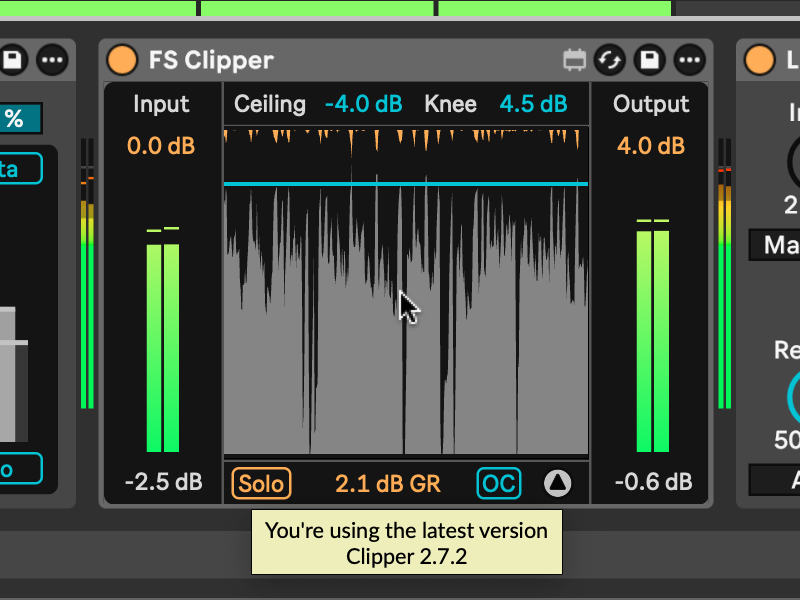
This feature is implemented for the main display of each device. Hovering over a display object from within Live for 2 seconds triggers the script to report the current version of the hovered instance using Max for Live’s Hints feature. This appears as a popup below the hovered object.
The instance version still appears if you are offline, before any update check. An internet connection is only needed to check for updates; if that fails, you still see your current version first, then the popup reports that it could not check for updates.
After version information is successfully retrieved, later hovers will show the result and will not check the internet again until the next Live session. If the check fails, it will retry on the next hover.
What the popup reports on hover:
- 2 seconds: the hovered instance version.
- 4 seconds: that it is checking for updates.
- 6 seconds: whether an update is available, that you are running the latest version, or an error message.
For maximum transparency, the script and version information can be found here.